Tutorial 1: Installing Jupyter Notebook
For running pywapor locally on your laptop, you need to install Python program and install pywapor package in your python environment. This can be done in several ways, however, we recommend you use Mamba package manager, because it is fast, robust, and cross-platform.
Once you have python and pywapor installed, you can run pywapor model through Python console (command line interface). However, we recommend you to use Jupyter Lab interface. JupyterLab is a web-based interactive development environment for notebooks, code, and data. It will allows you take notes, interact with you python scripts and save the outputs in digital notebooks.
In this book, we will take you through the steps to install python and python packages on your PC. The instructions are adapted from GISOpenCourseWare
4. Create WaPORMOOC environment
4.1. Clone a github repository
Now we've setup the environment, we need to get the Jupyter Notebooks and data that we'll use in this course.
The Jupyter Notebooks and related data are stored in a GitHub repository. We can easily clone the GitHub repository, which means that we'll create a local copy of the contents of the repository.
Git is a distributed version control system that tracks changes in any set of computer files and is used for coordinating work among programmers collaboratively developing source code during software development.
With git commands we can interact with git repositories such as GitHub. A nice way to learn git commands is the serious game Oh My Git.
In the next steps we're going to use git commands to clone the GitHub repository with the Jupyter Notebooks and related data.
1. Use the commands to go to the folder where you want to save the tutorials (note that the next step will create a subdirectory WaPORMOOC there).
2. Go to https://github.com/wateraccounting/WaPORMOOC.
3. Click the Code button.
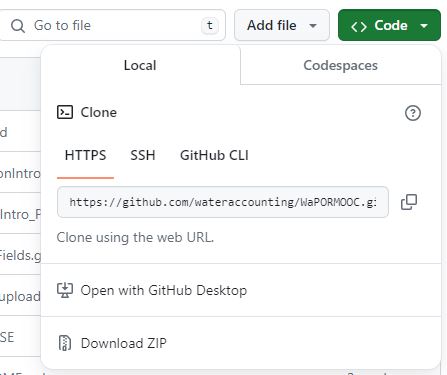
4. Copy the HTTPS link.
5. Now go back to the Miniforge Prompt and use the following git command:
git clone https://github.com/wateraccounting/WaPORMOOC.git
Note that the https link was pasted.
This will download all the WaPORMOOC materials of this and the next module to the subdirectory WaPORMOOC.
In the next subchapter you'll learn how to launch a Jupyter Notebook locally.